Mamiya 7 & & II
6×7 cm Rangefinder (1995 ~ c. 2014)
Intro Versions Specifications Lenses Rangefinder
Meter Meter Tricks Filters Flash Panoramic & Multi-Format
Expense Construction Quality Recommendations
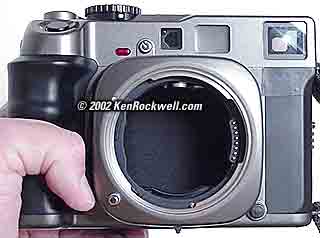
Mamiya 7 body (takes 120 or 220 film and dedicated lenses, uses one A544, PX28A, 4LR44 or L1325 6V battery, about $2,725 used if you know How to Win at eBay). Yes, I really ned to reshot this today in my studio; this is a snap from my 1999 Sony FD-88 Mavica — in email (240×320 pixel) mode!
This all-content, junk-free website's biggest source of support is when you use those or any of these links to approved sources when you get anything, regardless of the country in which you live. Thanks for helping me help you! Ken.
Feb 2025, April 2014 Mamiya Reviews All Reviews
The Mamiya 7 has been the world's best camera since the 1990s.
It's the most portable, well thought-out and easiest-to-use camera, along with having the highest real-world resolution available in any hand-held camera, now for $1,400 off.
Sample Image

Torino, Italy, October 2003. (10,000 x 8,000 pixels, shot with Mamiya 43mm on Velvia.)
Here's a reduced-size version of the scan, from my cheap Minolta Multi-Pro scanner.
This reduced-size version is only 10,000 x 8,000 pixels (80 megapixels) and greatly JPG compressed so you can see it over the internet. My original scan is 150 MP and devoid of the artifacts in the file I share here, and includes even more image area that I cropped-off.
No HDR, no long-exposure NR for this many-minute-long exposure required to get the sea of light along the bottom, no battery chargers, no oddball dedicated electronic cable releases and no BS: just plenty of time to think and shoot.
Today if I really wanted a great-looking scan, I can send my film out to be drum-scanned to retain the shadow detail that's on the film, but hidden here because I only used a consumer scanner. Likewise, DSLRs don't make exposures longer than 30 seconds unless I do gymnastics with external remote releases and noise reduction.

Introduction top

I buy only from these approved sources. I can't vouch for ads below. |



The Mamiya 7 is the world's best camera.
If I only could have one camera for everything I do, it would be the Mamiya 7 and the 43mm, 80mm and 150mm lenses.
Why? Because the Mamiya 7 offers technical image quality unmatched by anything, film or digital, this side of 4x5" film, and it's still small enough to carry around my neck all day long and shoot hand-held. It's easy to shoot fast, too, and has lenses of optical quality far beyond any 35mm or zoom lens.
Since large-format cameras don't work well hand held, this crowns the Mamiya 7 as the world's highest technical quality hand-held camera, period. It's a complete class above LEICAs, and DSLRs like the Nikon D3X, Canon 1Ds Mk III and 5D Mark II.
The Mamiya 7 is a 6×7cm medium-format rangefinder camera system with interchangeable lenses that takes 120 and 220 film. It has aperture-preferred automation and leaf shutters that are quieter, more accurate and freer from sharpness-robbing vibration than the primitive cloth focal plane shutters of the smaller format LEICAs That's all very cool.
The Mamiya 7 is a newer and less expensive to manufacture version of the Mamiya 6 (6x6cm) from the 1990s.
Unlike the Mamiya 6, the Mamiya 7 cannot collapse the lenses into the camera making it far more bulky.
I prefer the Mamiya 6 as a camera, but I prefer the Mamiya 7 system because I use the ultra-wide 43mm lens and love the larger 6×7cm format. The widest lens for the Mamiya 6 is a 50mm. See the comparison here.
The Mamiya 7 is an expensive camera with fantastic optics, but it's built with only second-rate mechanical quality. It can produce consistently spectacular images. I love it, but don't be disappointed when things start falling off your new $3,600 camera. Just look at the film you get back and you'll be ecstatic (happy).
Mamiya 7 vs. 7 II top
1995 ~ 1999: Mamiya 7.
The original came in a nice, dark painted titanium-style finish shown above.
1999 ~ c. 2014: Mamiya 7II.
It came either in black or a nasty painted chrome, euphemistically called "Champagne."
They're both the same camera. The differences are what color the plastic bodies are painted! The 7 comes in a dark metallic finish, while the 7 II comes in either plain black or a nasty painted silver.
Mamiya claimed "improvements" in the rangefinder in the 7 II, but all it was was a change in color, but no improvement in reliability, stability or accuracy. They both still need adjustments.
The7 II also adds multiple exposure capability and replaces the simple lens-changing curtain control on the original Mamiya 7 with a more complex fold-out lever. Mamiya also claims a "one-touch" exposure compensation adjustment; I suspect they removed the safety catch.
The 7 II adds an extra neck strap lug. Mamiya was able to retrofit this to the original Mamiya 7 if you wanted.
Specifications top
Type
6×7cm 120/220 medium format, interchangeable-lens rangefinder camera.
Format
6×7cm (2-1/4 x 2-3/4").
Actual image size: 56 x 70mm, horizontal somewhat dependant on lens used.
Film
120 or 220.
Pressure plate spins to select, and shows setting through a rear window.
10 shots on 120 film.
20 shots on 220.
Film Advance
By thumb.
Focus
Manual rangefinder (split-image in finder).
Finder Display
Framelines, focus spot and LEDs for shutter speeds.
Lenses
43mm f/4.5, 50mm f/4.5, 65mm f/4, 80mm f/4, 150mm f/4.5 and 210mm f/8.
Shutter
Electronic leaf shutter in each lens.
4s ~ 1/500 and bulb; controlled by the camera.
The camera has no shutter other than a focal-plane blind used as a dark slide when changing lenses.
Standard Cable Release Socket
YES!
Flash Sync
All speeds up to 1/500.
PC Terminal
Yes.
Meter
Narrow-angle sensor housed in the body near the rangefinder peephole.
Not TTL.
Exposure
Aperture-preferred automatic and metered manual.
Power
Common A544, PX28A, 4LR44 or L1325 6V battery, same as the Pentax Digital Spot meter and Canon SLRs of the 1970s. These batteries sell for under $3 and are half the size of an AA, so it's easy to carry a spare.
Battery Life
Years.
Price, USA
February 2025
About $2,725 used if you know How to Win at eBay, Mamiya 7 and 7 II combined.
The original Mamiya 7, which I prefer, sells for about $2,475 used, and the newer 7 II (which I don't prefer) sells for about $3,150 used.
April 2014
$3,900, body only. You could get it at Adorama with lens or body only, at Amazon w/lens or body only, or at B&H w/lens or body only.
November 2013
$2,400, body only.
Lenses top
Summary
Mamiya makes many more lenses than you need. Pick two or three to suit your needs and you're done. They are all optical perfection.
Most people want the 150mm, and one or two of the remaining choices. Mamiya makes three wide lenses for our convenience; no one actually carries all three.
I use the 43mm, 80mm and 150mm, and never miss any of the other lenses. In fact, I rarely use the 80mm; I just use the 43mm 75% of the time, the 150mm 20% of the time and the 80mm 5% of the time.
Except for a small ghost if you deliberately point the 150mm lens straight into the sun, they may as well be perfect. Feel free to point them at the sun, too: the leaf shutters are always closed, so nothing will burn up as it will on a LEICA or an SLR.
The rangefinder needs to be properly calibrated and used to get optimum focus, and therefore optimum sharpness, with the 150mm lens.
The 43mm lens is spectacular. It is a pain to use with the stupid external rangefinder.
I have not used the 50mm or 65mm lenses. I would suspect that they are optically perfect just like their brothers.
The 210mm f/8 lens is a joke. It has no ability to focus with the rangefinder, so you "focus" it by guessing the distance on the scale. The only application of which I can think for this lens is aerial photography where one sets the focus on infinity, however it is so slow at f/8 that one cannot use it for aerial photography because the shutter speeds would be too long to get sharp results unless one resorted to fast film. Skip the 210mm lens.
Lens Reviews
50mm f/4.5 (not yet reviewed, presume superb)
65mm f/4 (not yet reviewed, presume superb)
Infinite Depth-of-Field Trick
You can make use of my advanced perfect sharpness calculations to figure out what aperture to use to get the best sharpness anytime where you need depth of field and have a tripod so motion is not an issue. This has nothing to do with hyperfocal distances or circles of confusion or depth of field; it's a completely different sort of math solving for optimum sharpness also considering diffraction. Blindly setting f/22 can lose sharpness due to diffraction. You can read the mathematics here, but otherwise just use the aperture indicated by this table:
If the lens scale indicates |
then use |
f/32 |
f/32 1/2 |
f/22 |
f/32 |
f/16 |
f/22 1/2 |
f/11 |
f/22 |
f/8 |
f/16 1/2 |
f/5.6 |
f/16 |
f/4 |
f/11 1/2 |
Detailed instructions:
1.) Focus on the
closest thing you need sharp. Note the distance on the focus scale.
2.) Focus on the farthest thing you need sharp. Also note the distance
on the focus scale.
3.) Set the focus ring to midway between these two points and leave
it there for the photo.
4.) Presuming you really have the ring set midway between those two
points both the far and near readings will be next to the same aperture
indication on opposite sides of the depth-of-field scale. Read this
aperture.
5.) Find that aperture on the left of the chart above and set the lens
to the corresponding aperture on the right side of the chart.
Example:
With the 50mm lens let's say you want everything from 10 feet to 20 feet as sharp as you can get. You'll set the lens to 14 feet, read f/4 from the lens depth-of-field scale, and set the lens to f/11 1/2. This will be far sharper than using the f/4 the camera scale suggests, since that scale is based on a just barely acceptable fuzziness for handheld shots, and f/11 1/2 will also be sharper then just defaulting to f/22 since it has less diffraction than f/22. The math is here if you care. The calculations behind this very simple procedure are very complex and add diffraction Airy disc effects to the traditional depth of field and blur circle calculations.
Rangefinder top
Like many rangefinder cameras it may need to be adjusted to match your lenses to get the very best results, especially with the 150mm lens at f/4.5. More here about this. Most new Mamiya 7s seem to need some adjustment for critical use.
Meter top
Contrary to the sales literature, the Mamiya 7 meter is SPOT only, making it difficult to use quickly and requiring much skill. You have no choice but to be fluent with the zone system, and you also need to identify the actual area metered.
The spot on my Mamiya 7 meters an area about the size of the rangefinder spot, a little below and to the right of the actual rangefinder spot. Different samples of camera will have their spots pointed in slightly different directions. Test yours by pointing it at a bare bulb at night and noting how the meter reads as you point the camera around.
The meter reads exactly the same area regardless of lens attached. It reads through a separate port just above the rangefinder window on the camera body. It does not read through the lens.
Mamiya makes me laugh. They list different relative angles of view for different lenses. This is because the metering area remains the same but the lens' angle of view is changing!
I only use the meter in AEL or A mode, in which case it is effectively stepless.
The built-in meter is sort of useless in manual mode because it only reads to full stops. Unlike every other manual meter, there is no "0" or null indication to show you the correct exact exposure. Because of this you may be off as much as a half stop and not know it. This is critical for slides, unimportant for negatives.
You ought to wiggle the aperture ring in manual mode and use the aperture setting in the middle of the range over which your chosen shutter speed is indicated.
It is very useful and sensitive for night photography if you follow the tricks below.
As most cameras, manual shutter speeds go in full stops and lens apertures are continuously variable.
Metering Tricks top
Filters
When using filters dial the compensation into the camera manually. For a Tiffen screw-in neutral-density Grad ND 0.6 I just dial in +1 and fire away, easy. For a Polarizer I dial in the amount I've measured by previous tests, since polarizers vary. Most need +1 2/3 stops. You can use regular cheap linear polarizer filters. You cannot see the effect through the viewfinder, since the viewfinder is polarized. Watch it, because of this you may be seeing effects that you won't see on your film. Only use the viewfinder for composition, focus and exposure reading. Look through your filters held up to your eye to see the polarization effects. You may be able to hold a circularly polarized filter up to the viewfinder and see the effect accurately. I have not tried it.
Even with the polarized view through the finder I have not seen exposure errors with heavily polarized subjects. This tells me that the meter is not reading through the polarized section.
See more on my filter page about how to use graduated ND filters and polarizers here.
Manual or Auto Exposure?
Manual exposure readings only read to the nearest full stop, so you will only be within a half stop in manual metering mode. This makes the manual meter kind of useless. Because of this I prefer the AEL mode for everything. Otherwise, if shooting transparencies I suggest dithering the aperture ring and finding the aperture that causes the camera to read in the center the indicated shutter speed. Remember, manual speeds only set in full stops, and in the auto modes they set to any speed they need.
Exposure Compensation
Quick exposure compensations are made by holding the shutter button partway down to lock the exposure in AEL and shifting the aperture ring a click or two whichever way you want it.
Night Photography
In extremely low light where you need more than 4 seconds of exposure, set the meter to a faster film speed (and add negative exposure compensation if needed), make your reading manually, and then convert to the longer exposure time in your head.
For instance, at night I prefer to set the camera to a film speed six stops faster than my film and set the exposure manually. In this case the meter reads directly in minutes, since six stops is a factor or 64 times, the same difference as a second is to a photographic minute. (A photographic minute is 64 seconds long.)
For Velvia 50, I set the meter to EI 1,600 and minus one stop exposure compensation, for an equivalent of EI 3,200 (3,200 = 50 x 32).
If the meter reads 1/4 second at f/5.6 I use a quarter minute (16 second) exposure at f/5.6. 16 seconds is 1/4 of a photographic minute.
For the less mathematically inclined, here are the numbers. Remember to set film speed six stops faster and then use this table:
If meter reads (at six stops higher film speed) |
Then use this exposure |
1/60 |
1 sec |
1/30 |
2 sec |
1/15 |
4 sec |
1/8 |
8 sec |
1/4 |
16 sec |
1/2 |
32 sec |
1 |
64 sec |
LT |
1 - 4 minutes |
Note: add exposure if required due to reciprocity effects particular to your film.
If it's still too dark, take your reading at a larger apertures and do more math in your head to calculate the exposure at your taking aperture. For instance, if you get two seconds at f/4, use 16 seconds at f/11.
Filters, use with top
I've found an important side benefit to carrying and using only 67mm filters and a step-up ring to cover both the 58mm and 67mm filter sizes with the Mamiya 7 system.
One may stack more 67mm filters on the 58mm threaded lenses without vignetting than if one used 58mm filters.
This is important since it both saves carrying an extra dozen filters in a second size, and several filters can be stacked to create effects without vignetting.
For instance, an 85C, an FLD and a grad ND will turn a blah sunset into an epic one.
See how to use polarizers and graduated ND filters on my filter page here.
Flash, use with top
This is a no-brainer. The Mamiya 7, like almost all larger format cameras, is decades behind AF 35mm SLRs here. This means you can use any flash, even flashbulbs, with it. There is no TTL mode or dedication to worry about.
For flashbulbs you only have X-sync. See the exposure recommendations for each flashbulb on the box.
I prefer any electronic flash with an A or AUTO mode. I use the tiny Nikon SB-E (20 years old and worth $30).
Simply set the flash to an auto setting that gives you enough range, and set that aperture on the camera.
For fill flash, this is really easy: set the camera to one stop less than the flash's calculator indicates. In other words, if the calculator on the flash says use f/5.6 at the film speed you are using, set the camera instead to f/8. Now use the camera's A mode. The camera will automatically adjust itself for the ambient light, and the flash will automatically adjust itself for just the right amount of fill.
To adjust the fill ratio, just change the flash's auto setting or the camera's f/stop. For less fill, set the camera two stops below what the flash indicates. For very heavy fill (using the same aperture on the camera indicated by the flash) set the camera's compensation to -1 stop, otherwise you'll have full flash exposure AND full ambient exposure adding up to a stop of overexposure unless you dial in some - compensation on the camera.
Flash Sync is 1/500, faster than any LEICA or any 35mm film SLR.
Of course there is a PC sync terminal for use in the studio.
Panoramic & Multi-Format Options top
These options are stupid gimmicks.
The panoramic option only makes sense in the rare case that you happen both to be a full time pro and that you intend to present a portfolio to clients as original transparencies.
In this rare case it looks a little neater to have the transparencies already cropped in-camera as they are with this idiotic option. Even in this case it's a waste of time: there are no standard mounts or pages for that pan format anyway (just mounts in non-pan sizes masked down to pan apertures), so it still looks stupid.
Not only that, using 35mm film in the pan adapter costs as much as 6×7 film per shot. Even worse, using the pan adapter commits you to that format for the whole roll. Use no pan adapter and crop the few you may want as pan shots and you'll be much better off.
Why So Expensive? top
Mamiya USA inflates the price because they can. The prices of used Mamiya gear in the USA is more than the price of new gear in Japan. The Mamiya 7 is not well made. It's just expensive, ultra-portable and gives fantastic results.
You can pay for a trip to Japan or other country with the amount you'll save on buying a system there.
Pay attention to import customs rules. Mamiya is militant about enforcing their trademark rights, so if you try to order (or carry back from) overseas, your Mamiyas my get stopped at customs. Watch it. Some people are successful ordering over the Internet from overseas and saving 40%, while others have their gear confiscated.
Watch yourself. You may loose your camera at customs if you try bringing one back. Don't ask me; I bought mine here.
Construction Quality top
First rate construction is what you get with Linhof, pro Nikon, HASSELBLAD, Contax, LEICA and similar cameras. They are built tough, and seem as if they were created in Heaven by God himself. It seems as if no human has ever touched them.
Consumer point-and-shoots and cheaper model Nikons, Canon, Minolta and other SLRs use a lot of plastic and cheaper materials. I call these second rate. Even though the materials are lighter, they still appear to be made by Angels and work absolutely perfectly, in spite of the fears of old-timers who equate mass with class.
Third rate cameras are those like this Mamiya. The plastic top and bottom covers are molded with a lot of slop and visible mold lines. Screws and screw heads are obviously used in holding the camera together. In cold weather the lube inside the lenses make them hard to focus. The rangefinder is always going out of adjustment. The rubber eyecup is help on with glue and fell off. The focus ring on one lens fell off while I was in Peru and I needed to screw it back on. There is little sealing against the elements so sometimes a little grit will get in the exposure compensation control and it can stick a little.
Get used to it. You have to pay a little more for the Mamiya 7 in the USA than a Hasselblad, and yes the Mamiya is cheaply made. If you want light weight and great results get the Mamiya, if you want build quality get the Hasselblad.
The Mamiya 7 wins on results and portability. Once you see the quality of the results after you've been won over by the portability, you'll never complain about the construction quality again.
Recommendations top
I love my Mamiya 7. I won a trip to Hawaii with a photo I made with it. I consistently turn out spectacular images with my Mamiya 7, and it weighs next to nothing.
If you are a photographer, go get a system.
If you are just a camera collector who appreciates well-made cameras for their own sake, get a well made camera like a Rollei, HASSELBLAD or LEICA instead.
This page here compares a 6 x 7 cm Mamiya 7 to the Nikon D2X. Even this compact medium format camera easily trounces the digital.
© Ken Rockwell. All rights reserved. Tous droits réservés. Alle Rechte vorbehalten. Alla rättigheter förbehållna. Toate drepturile rezervate. Omnia jura reservata. Ken Rockwell® is a registered trademark.
Help Me Help You top
I support my growing family through this website, as crazy as it might seem.
The biggest help is when you use any of these links when you get anything. It costs you nothing, and is this site's, and thus my family's, biggest source of support. These places always have the best prices and service, which is why I've used them since before this website existed. I recommend them all personally.
If you find this page as helpful as a book you might have had to buy or a workshop you may have had to take, feel free to help me continue helping everyone.
If you've gotten your gear through one of my links or helped otherwise, you're family. It's great people like you who allow me to keep adding to this site full-time. Thanks!
If you haven't helped yet, please do, and consider helping me with a gift of $5.00.
As this page is copyrighted and formally registered, it is unlawful to make copies, especially in the form of printouts for personal use. If you wish to make a printout for personal use, you are granted one-time permission only if you PayPal me $5.00 per printout or part thereof. Thank you!
Thanks for reading!
Ken.